> ## Documentation Index
> Fetch the complete documentation index at: https://www.klaroai.ch/docs/llms.txt
> Use this file to discover all available pages before exploring further.
# Customize
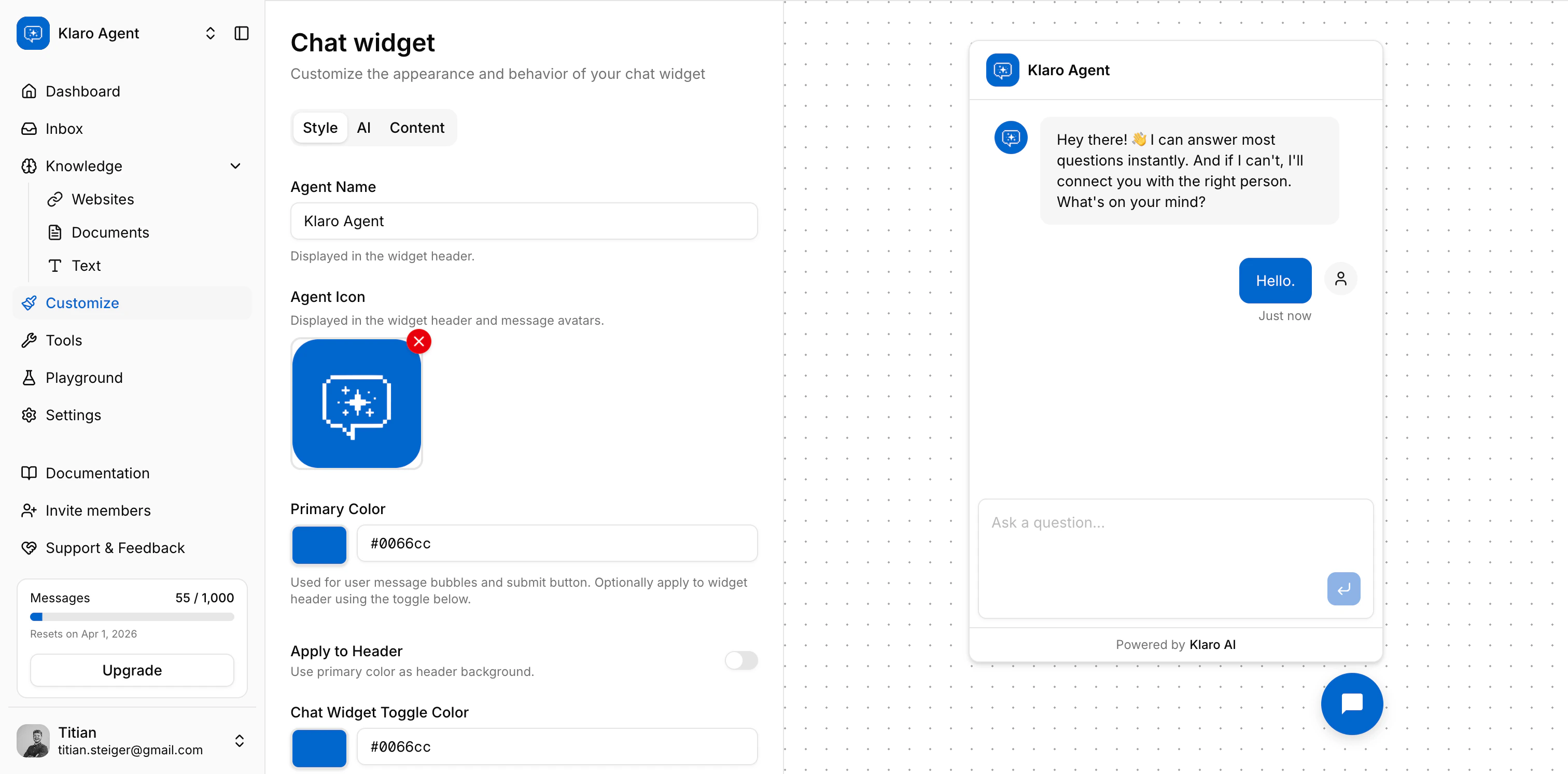
The Customize page is where you control how your agent looks, thinks, and talks. You'll find it under **Customize** in the sidebar. It has three tabs: **Style**, **AI**, and **Content**.
Changes don't save automatically - a floating save bar appears when you've made edits. Hit **Save Changes** to apply, or **Reset** to undo.
> **Access:** You need Editor or Owner access to customize an agent. Viewers can't open this page.
 ***
## Style
These settings control your agent's visual appearance inside the chat widget.
### Agent Name
The name shown in the widget header and anywhere the agent introduces itself. Keep it short and on-brand - 50 characters max.
### Agent Icon
A small image shown in the widget header and next to each agent message bubble. Accepted formats: PNG, JPG, GIF, WebP, SVG - max **2 MB**. If you leave this empty, the widget uses a default avatar.
### Primary Color
The color used for user message bubbles and the send button. Enter any valid hex value (e.g. `#1A73E8`). You can type directly or use the color picker.
Toggle **Apply to Header** to also use this color as the widget header background. Useful if you want a branded look end-to-end.
### Chat Widget Toggle Color
The background color of the floating button that opens the widget on your site. Defaults to black (`#000000`) - change it to match your site's design.
### Chat Widget Toggle Icon
An optional custom icon for the floating toggle button. Same format/size rules as the Agent Icon.
### Hide "Powered by" Branding
Removes the Klaro AI credit from the widget footer. This is a **Pro plan** feature - if you're on a lower tier, you'll see a link to upgrade.
***
## AI
These settings control how your agent generates responses.
### Instructions (System Prompt)
This is the most impactful setting on this page. The system prompt tells the agent who it is, what it does, and what it should never do. A well-written prompt significantly improves response quality.
A solid prompt typically covers:
* The agent's role ("You are a support assistant for Acme Inc.")
* Tone and personality ("Respond concisely and in a friendly tone.")
* Hard constraints ("Never discuss competitor products. Always recommend contacting support for billing questions.")
* What to do when the agent doesn't know something
### AI Model
The model currently powering your agent. This is set by Klaro AI and isn't configurable in-app - we keep it updated to the best available option for your use case for now.
### Temperature *(gpt-4 models only)*
Controls how creative or predictable the responses are. The slider goes from **0** (very consistent and conservative) to **1** (more varied and creative). For support use cases, we recommend staying between **0.3–0.6** reliable enough to be accurate, flexible enough to sound natural.
This setting only appears if your agent is running on a gpt-4 series model.
### Formal Tone
Toggle this on if you want the agent to use formal language (e.g. German "Sie" instead of "du"). Useful for business contexts where a formal register is expected.
***
## Content
Content settings control the text the agent shows in the widget UI itself - not the AI's conversational responses, but the hardcoded strings like greetings and placeholders.
Each field has separate values for **English (EN)** and **German (DE)**. Toggle between languages using the EN / DE buttons next to each field. At runtime, Klaro serves whichever language matches the visitor's locale and falls back to English if a translation isn't set.
### Welcome Message
The first message a visitor sees when they open the widget, before they've typed anything. Make it warm and clear about what the agent can help with.
*Example:* "Hi there 👋 I'm here to help. Ask me anything about our products."
### Fallback Message
Shown when the agent can't find a relevant answer in its knowledge base. Set an expectation and give the visitor a next step - don't leave them hanging.
*Example:* "I don't have a good answer for that right now. Feel free to reach out to our team directly at [support@acme.com](mailto:support@acme.com)."
### Input Placeholder
The hint text shown inside the chat input field before the visitor starts typing. Keep it short and action-oriented.
*Example:* "Ask a question…"
***
## How localization works at runtime
When a visitor opens your widget, Klaro determines their locale from the URL (e.g. `/de/embed/...` vs `/en/embed/...`) or their browser's `Accept-Language` header. It then serves:
* The **matching language** content from `content_i18n` (EN or DE)
* **English as a fallback** if the matched language has no content set
This means: if your site only shows the German widget, but you haven't filled in the DE fields, visitors will see the English strings. Always fill in both languages if you're running a multilingual site.
***
**Next up:** [Configure → Tools](./en/configure/tools) — add the content your agent will draw answers from.
***
## Style
These settings control your agent's visual appearance inside the chat widget.
### Agent Name
The name shown in the widget header and anywhere the agent introduces itself. Keep it short and on-brand - 50 characters max.
### Agent Icon
A small image shown in the widget header and next to each agent message bubble. Accepted formats: PNG, JPG, GIF, WebP, SVG - max **2 MB**. If you leave this empty, the widget uses a default avatar.
### Primary Color
The color used for user message bubbles and the send button. Enter any valid hex value (e.g. `#1A73E8`). You can type directly or use the color picker.
Toggle **Apply to Header** to also use this color as the widget header background. Useful if you want a branded look end-to-end.
### Chat Widget Toggle Color
The background color of the floating button that opens the widget on your site. Defaults to black (`#000000`) - change it to match your site's design.
### Chat Widget Toggle Icon
An optional custom icon for the floating toggle button. Same format/size rules as the Agent Icon.
### Hide "Powered by" Branding
Removes the Klaro AI credit from the widget footer. This is a **Pro plan** feature - if you're on a lower tier, you'll see a link to upgrade.
***
## AI
These settings control how your agent generates responses.
### Instructions (System Prompt)
This is the most impactful setting on this page. The system prompt tells the agent who it is, what it does, and what it should never do. A well-written prompt significantly improves response quality.
A solid prompt typically covers:
* The agent's role ("You are a support assistant for Acme Inc.")
* Tone and personality ("Respond concisely and in a friendly tone.")
* Hard constraints ("Never discuss competitor products. Always recommend contacting support for billing questions.")
* What to do when the agent doesn't know something
### AI Model
The model currently powering your agent. This is set by Klaro AI and isn't configurable in-app - we keep it updated to the best available option for your use case for now.
### Temperature *(gpt-4 models only)*
Controls how creative or predictable the responses are. The slider goes from **0** (very consistent and conservative) to **1** (more varied and creative). For support use cases, we recommend staying between **0.3–0.6** reliable enough to be accurate, flexible enough to sound natural.
This setting only appears if your agent is running on a gpt-4 series model.
### Formal Tone
Toggle this on if you want the agent to use formal language (e.g. German "Sie" instead of "du"). Useful for business contexts where a formal register is expected.
***
## Content
Content settings control the text the agent shows in the widget UI itself - not the AI's conversational responses, but the hardcoded strings like greetings and placeholders.
Each field has separate values for **English (EN)** and **German (DE)**. Toggle between languages using the EN / DE buttons next to each field. At runtime, Klaro serves whichever language matches the visitor's locale and falls back to English if a translation isn't set.
### Welcome Message
The first message a visitor sees when they open the widget, before they've typed anything. Make it warm and clear about what the agent can help with.
*Example:* "Hi there 👋 I'm here to help. Ask me anything about our products."
### Fallback Message
Shown when the agent can't find a relevant answer in its knowledge base. Set an expectation and give the visitor a next step - don't leave them hanging.
*Example:* "I don't have a good answer for that right now. Feel free to reach out to our team directly at [support@acme.com](mailto:support@acme.com)."
### Input Placeholder
The hint text shown inside the chat input field before the visitor starts typing. Keep it short and action-oriented.
*Example:* "Ask a question…"
***
## How localization works at runtime
When a visitor opens your widget, Klaro determines their locale from the URL (e.g. `/de/embed/...` vs `/en/embed/...`) or their browser's `Accept-Language` header. It then serves:
* The **matching language** content from `content_i18n` (EN or DE)
* **English as a fallback** if the matched language has no content set
This means: if your site only shows the German widget, but you haven't filled in the DE fields, visitors will see the English strings. Always fill in both languages if you're running a multilingual site.
***
**Next up:** [Configure → Tools](./en/configure/tools) — add the content your agent will draw answers from.